Approval Mode
1. What is it?
Approval Mode is a safety mode where Blaze pauses and asks for your approval right before it makes a change to your Salesforce org — such as a configuration change or a record operation.
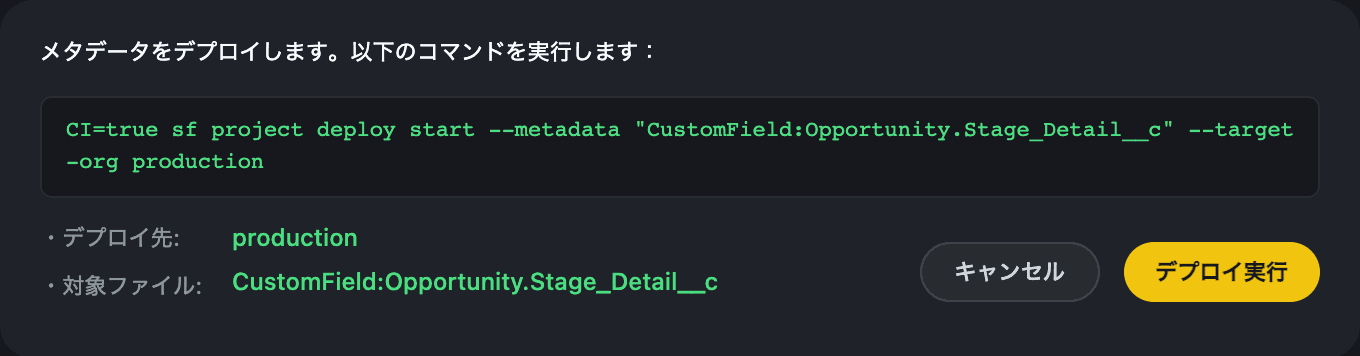
Before hard-to-undo operations like deploying metadata or deleting records, Blaze stops and shows you what it is about to do, against which org, and with exactly which command. Nothing runs until you approve it.
Harmless operations like reading or investigating proceed as usual, so your workflow doesn’t slow down.
2. Differences from normal mode
| Normal mode | Approval Mode | |
|---|---|---|
| Config changes / record operations | Run immediately | Show a confirmation first |
| Reading / investigating | Run immediately | Run immediately |
3. How to switch
In the main window or Launcher, you can switch in either of two ways.
- Press Shift + Tab to cycle through
Normal → Approval → Requirement → Normal. - Press the ”+” button to the left of the input box and turn on “Approval Mode” in the menu.
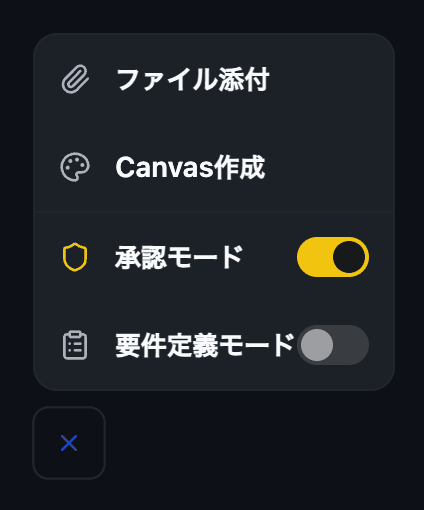
The current mode is shown below the input box.
4. Reading the confirmation
When Blaze is about to run an impactful operation, a confirmation appears.
- What it is about to do — a description such as deploy or record operation
- Deploy target — the Salesforce org the change applies to
- Target files — the metadata or files affected
- Command — the exact command that will run
Review it, then choose Run (Enter) or Cancel (Esc).
5. Operations that trigger confirmation
| Type | Examples |
|---|---|
| Deploy | Applying metadata / deleting source |
| Record operations | Creating, updating, deleting, or importing records |
| Org operations | Creating or deleting a Scratch / Sandbox org |
| Apex execution | Running Apex code against an org |
| Packages | Installing or creating a package version |
| Permission assignment | Assigning a permission set / permission set license |
| API writes | Modifying org data via the REST / Bulk API |
Read-only operations are not subject to confirmation, such as querying data or retrieving metadata.
6. Recommended usage
- Always keep Approval Mode on when working against a Production org
- Until you’re comfortable, review each operation in Approval Mode
- Switch to normal mode only for repetitive routine work in a Sandbox