v0.11.0 : Update notes (2026/07/07)
💡 Thank you for using Blaze!
1. Added domestic mode for running AI inference on Japan-hosted models
- Admins can now enable domestic mode from the account dashboard.
- Core Blaze-side processing, including authentication and account management, can now be kept within Japan, and AI inference can also run on Japan-hosted models.
- In domestic mode, the model selector shows only models that are available for domestic mode, reducing the chance of selecting an unavailable model.
- The dashboard now makes it easier to confirm the current domestic mode setting and available domestic-hosted models.
2. Conversation history grouped by Salesforce org
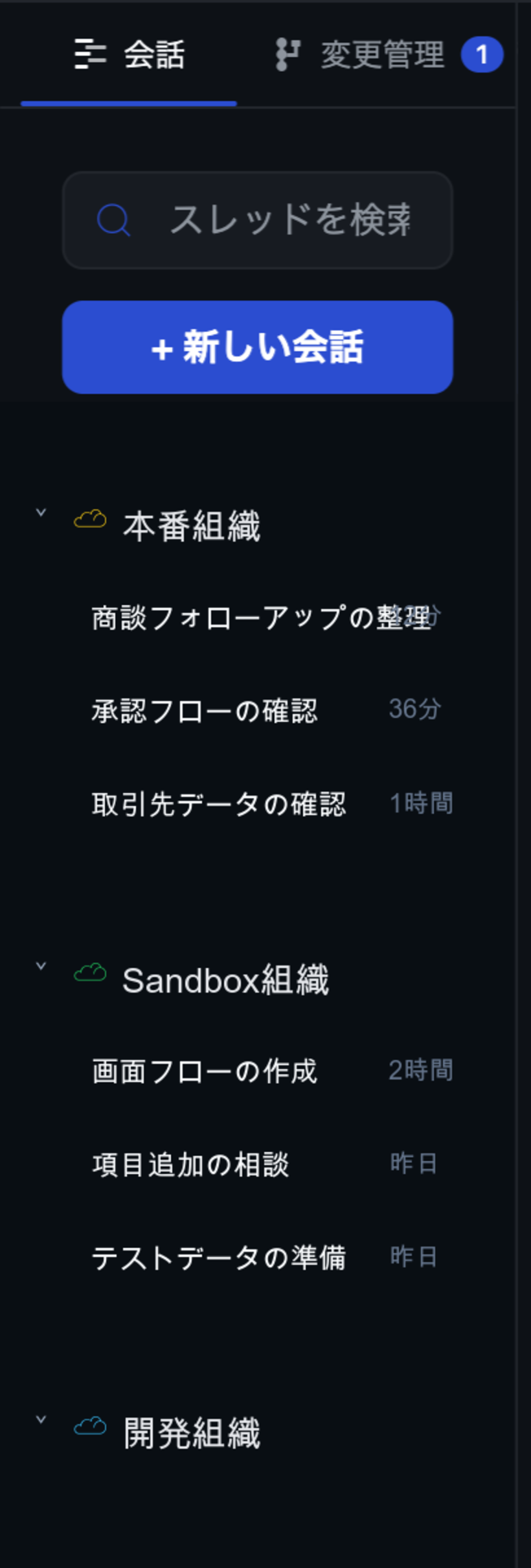
- The sidebar now groups conversation threads by the connected Salesforce org.
- New conversations are automatically associated with the current org, making it easier to understand which org each conversation belongs to later.
- Custom org labels, environment colors, and org icons are reflected in the sidebar for faster scanning.
3. More efficient token usage
- Agent internals have been optimized so the same work can be completed with fewer tokens than before.
- Prompt cache usage has been improved, helping reduce unnecessary token consumption during repeated work and longer conversations.
- Settings-related tool descriptions have also been tightened so the agent receives only the information it needs.
4. Agent-assisted settings updates
- The Blaze agent can now help operate settings more directly.
- Required settings fields and execution results are easier to see during the conversation, with clearer real-time feedback.
| Settings category | Agent-supported operations |
|---|---|
| Basic settings | Change theme, display language, completion notifications, background behavior, launch at login, and launcher behavior |
| Work modes | Toggle approval mode and change display behavior |
| Salesforce org settings | Check or change org enablement, custom labels, and org-specific custom prompts |
| MCP and external tools | Add, update, delete, enable, and configure MCP servers, credentials, and tool updates |
| Skills | Add, update, delete, enable, and import Skills from ZIP files |
| Account and devices | Disconnect connected orgs, review devices, and revoke devices |
- The settings keys that the agent can operate are explicitly limited to reduce unintended changes.
5. Faster startup and response feel
- Startup work has been optimized so the app moves from the splash screen to login and the main window more quickly.
- Message sending, live updates, and streaming display have been tuned so responses feel faster after you submit a prompt.
- Windows background work, log retention, and tool startup behavior have been improved for more stable long-running sessions.
6. Improved Salesforce tool safety
- Salesforce tool execution has been hardened to improve command safety.
7. Other improvements
- Fixed a Windows issue where console output could cause a crash loop.
- Fixed intermittent issues that could prevent passkey or Google sign-in from completing.
- Fixed an issue in version control where “Restore” could fail due to unmanaged files.