v0.3.0 : Update notes (2026/02/27)
Thank you for using Blaze.
Blazer 1 generally available
Our proprietary high-speed agent mode “Blazer 1”, previously available to a subset of users, is now available to everyone.
Blazer 1 highlights:
-
Fast response — light-weight agent behavior on our own infrastructure
-
Full use of Bash execution, file operations, WebSearch and other tools
-
Built for long tasks — sustained execution up to 4 hours and 200 rounds
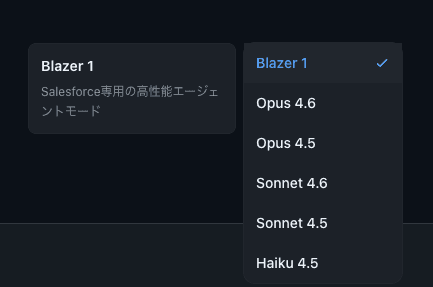
How to use:
Choose “Blazer 1” from the model selection menu.
Snapshots saved on file edits
Whenever Blaze edits a file, a snapshot is now saved automatically.
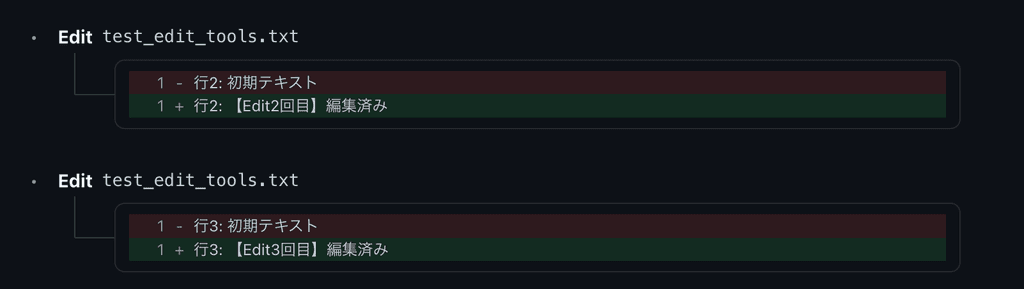
Changes are visualized as on the left:
-
Red background: removed text
-
Green background: added text
Canvas sharing
Canvas content created in Blaze (reports, charts, documents, etc.) can now be shared externally via URL.
What you can do:
-
Copy the URL to share — anyone can view it in a browser
-
Toggle public/private — stop sharing whenever you want
-
Manage multiple independent Canvases per conversation
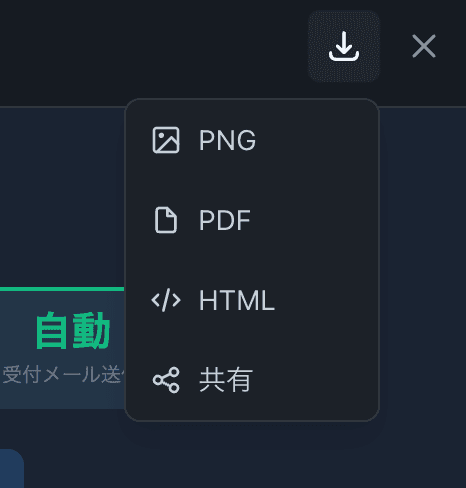
How to use:
Open the share dialog from the “Share” button in the top right of the Canvas, then copy the URL.
Pin conversation threads
You can now pin important conversation threads to the top of the sidebar.
What you can do:
-
Pin frequently used or project-level conversations for quick access
-
Pinned conversations appear in the top “Pinned” section of the sidebar
-
Unpin or delete from the right-click menu (…)
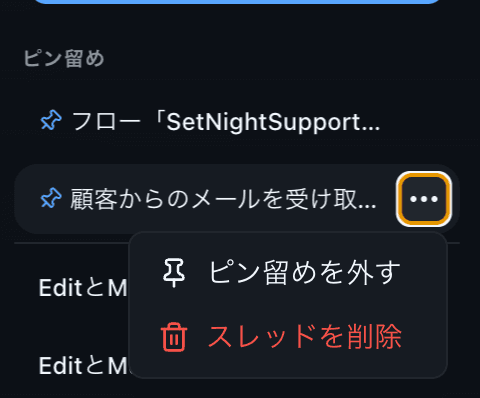
How to use:
Click the ”…” button on a conversation in the sidebar and choose “Pin”.
UI improvements
A handful of details that improve the feel.
-
Sidebar design refresh — selected conversation highlight is simpler
-
Conversation panel animation — opens and closes more smoothly
-
“Thinking” indicator in Blazer 1 mode — clearer end-of-thinking display
-
Shortcut hints — keyboard shortcut hints added to the send button
Other fixes
- Greatly increased the row limit for CSV attachments (100 rows → 10,000 rows)