v0.3.7 : Update notes (2026/03/18)
Thank you for using Blaze!
1. Approval Mode added to Blazer 1
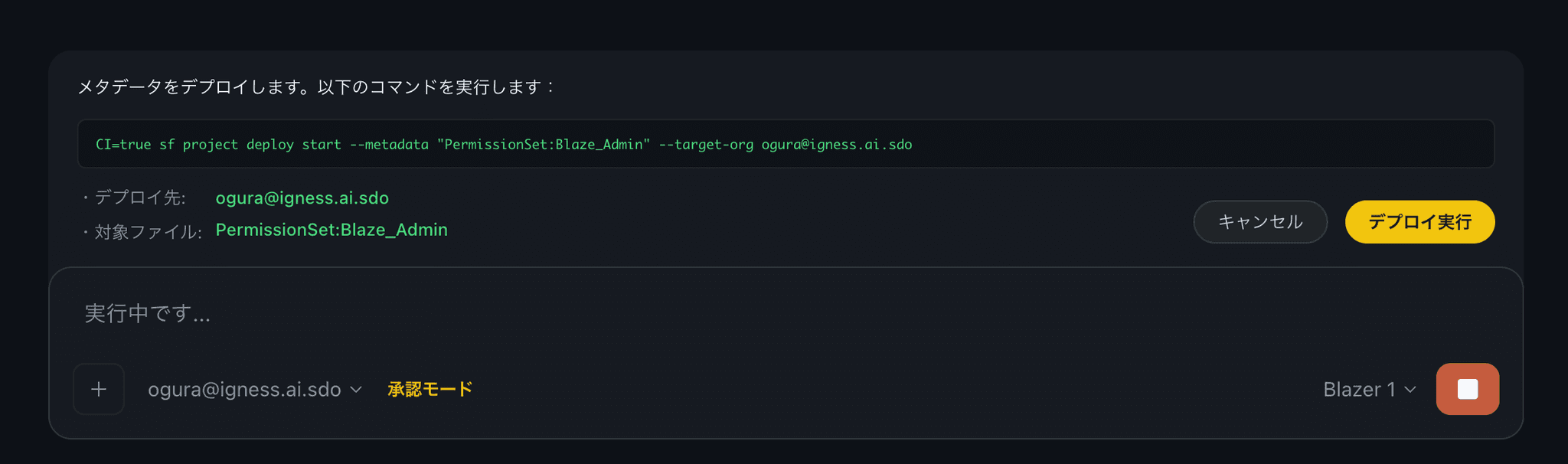
A new approval mode for safer Salesforce deploys. Before any destructive deploy command runs, you can review the target files and approve or deny.

-
Toggle on/off: turn approval mode on or off with a single click
-
Pre-deploy confirmation: when a Salesforce deploy command runs, the affected files and the operation are listed for your approval
-
dry-run is auto-excluded: deploy commands with
--dry-rundon’t require approval and run as-is -
Better visibility for affected files: deploy targets are highlighted in green so they’re easy to spot at a glance
2. New keyboard shortcuts
Added new keyboard shortcuts to make you more efficient. The shortcut key is shown as a tooltip on the toggle button.
3. Other fixes
-
Blazer 1 stuck issue: fixed an issue where some LLM responses caused the process to stall
-
Salesforce CLI compatibility: improved the stability of running Salesforce CLI commands from Blazer 1
-
Other performance improvements