Files
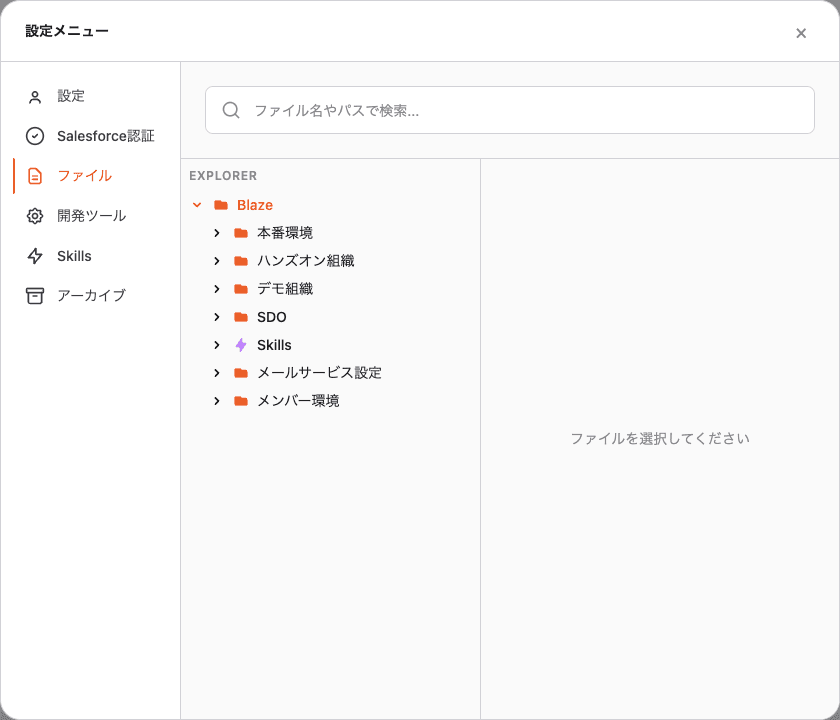
1. What is it?
Blaze keeps exported files, SKILL.mds, and attachments locally — one
directory per Salesforce org. This tab is a single explorer where you can
search, view, edit, and delete them all.
Files live under the OS user-data directory. Operating them from this tab is the safe path.
2. Where to open
Profile (bottom-left) → Settings → Files.
3. Directory layout
Under the top-level Blaze you’ll find two kinds of folders:
| Folder | What’s inside |
|---|---|
Org folders (e.g. Production / Demo Org / SDO) | Data per connected Salesforce org. The name is whatever custom label you set in Salesforce Auth |
Skills/ | Installed Skill definitions (SKILL.md and helpers) |
Inside each org folder, the two subfolders you usually touch are:
| Subfolder | What’s inside |
|---|---|
force-app/main/default/ | Salesforce metadata pulled from that org (CustomObject / Apex / Flow…) |
files/ | CSV, PDF, Markdown and other attachments from your conversations |
Note: A few internal folders (
cli/,secrets/,Crashpad/etc.) also sit at the top level. You normally don’t need to touch them.
4. What you can do
A. Search
Type into the search box at the top — file name and path fragments match across the whole tree.
B. Open and edit
Click any file to load it into the Monaco editor on the right. Syntax
highlighting works for .md / .xml / .cls / .json and friends, and you
can edit in place.
Saving writes to disk locally. To push the change back to Salesforce, ask Blaze to deploy it through the matching Skill or command.
C. Delete
Use the context menu in the right panel. This action cannot be undone.
D. Reveal in Finder / Explorer
The context menu also opens the file or folder in the native OS file manager.
5. Edit a Skill’s SKILL.md directly
After installing a Skill, you’ll see it under Skills/<skill-name>/SKILL.md.
For small tweaks (wording, conditions) it’s usually faster to edit it here than
to re-open it in the Skills tab.
6. FAQ
Q. The tree feels slow — too many files
The tree loads on first expand. Collapsing the org folders you aren’t using keeps the view light. For lookups, the search box is fastest.
Q. A file I expect isn’t here
The Salesforce CLI only syncs what you’ve explicitly retrieved. Ask Blaze to “retrieve the definition of object XYZ” inside a conversation, and it will show up here.
Q. I deleted something by accident
There is no OS Trash fallback. Retrieve the file again from the org, or
restore from a *_backup_* folder if one exists. Back up important files
beforehand.