Salesforce Auth
1. What is it?
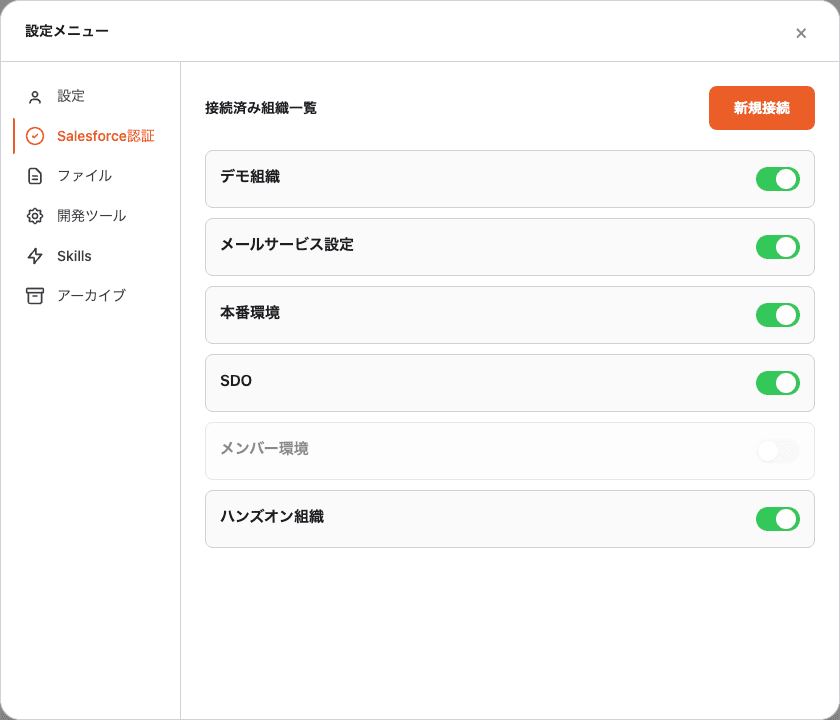
A single place to manage every Salesforce org connected to Blaze. If you juggle multiple production orgs, sandboxes, or scratch orgs, this is where you enable / disable / connect / re-label them.
2. Where to open
Profile (bottom-left) → Settings → Salesforce Auth.
3. Manage connected orgs
The “Connected orgs” list shows every org you’ve ever authenticated.
Each row carries:
- Custom label (e.g. “Sales Org”, “Production”, “Demo Org” — whatever you named it)
- Org URL (
https://...my.salesforce.com) - Enable / disable toggle (green = enabled)
A. Rename an org (custom label)
Click the label to edit inline. Save with Cmd / Ctrl + Enter.
This label is what shows up in the org selector during a chat — pick names
like “Prod”, “Sandbox”, “Demo” so you don’t second-guess when
switching.
B. Temporarily disable an org
Flip the toggle off and the org disappears from the org selector without deleting the connection. Flip it back on to restore it. Useful to hide a production org you don’t want to touch by accident.
4. Connect a new org
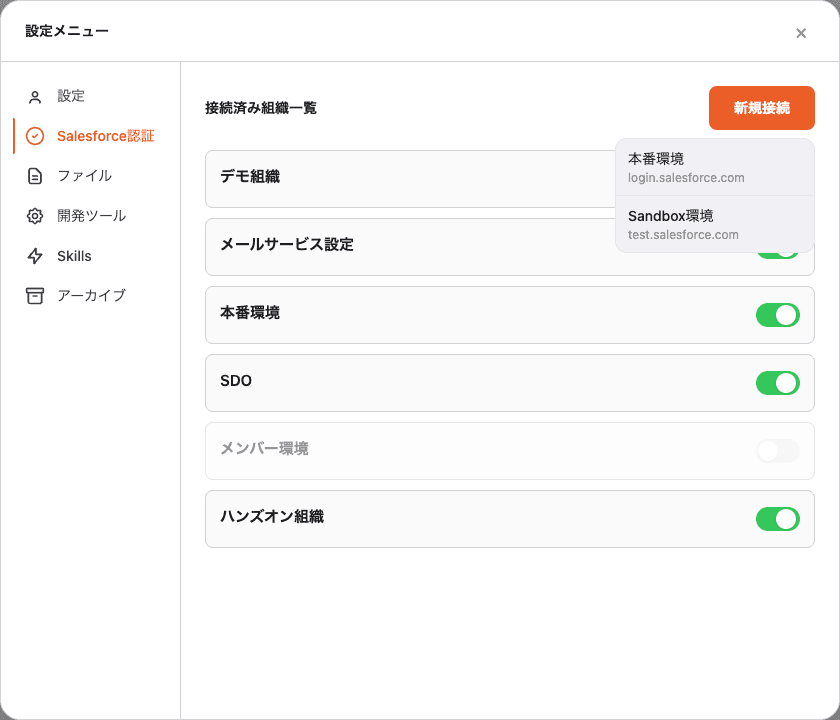
Click ”+ New connection” on the top-right and choose where to authenticate:
| Choice | Connects to |
|---|---|
| Production | login.salesforce.com (Production / Developer Edition) |
| Sandbox | test.salesforce.com (Sandbox) |
The OAuth browser opens. Sign in to Salesforce and click “Allow” — the org appears in the list immediately.
5. Switch orgs in a chat
The org selector near the chat input lists every org enabled here. You can hold a separate custom prompt per org, so production and sandbox can behave differently. See Custom Prompt.
6. FAQ
Q. How do I revoke (log out of) a connection?
Click the row → “Disconnect” in the detail panel. Blaze deletes its stored token; the Salesforce session itself is unaffected.
Q. Can I authenticate the same org twice?
Yes — the most recent token overwrites the previous one. When a token expires, just run the auth flow again.
Q. Where are tokens stored?
In the OS secure store (macOS Keychain, Windows Credential Manager), encrypted. Tokens never sit in plain text inside the Blaze app.